Losing an important email can be frustrating, especially when the message contains work details, personal memories, account information, or something you needed for later. That is why many people search for a gmail message recovery tool when an email suddenly disappears.
The good news is that you may not need a separate recovery program. In many cases, Gmail already provides ways to find messages that were deleted, archived, moved, or filtered into another folder. However, the right recovery method depends on what happened to the email and how long ago it disappeared.
Therefore, before trying an unknown recovery service, it is worth checking Gmail carefully. A few simple steps can sometimes bring a missing message back. This guide explains the most useful recovery options in clear language, so you can understand what to try first and when a third-party tool may not be appropriate.
Top Gmail Message Recovery Tool Options
Before searching for external software, check Gmail’s built-in recovery locations. Often, the missing message is still available somewhere in your account.
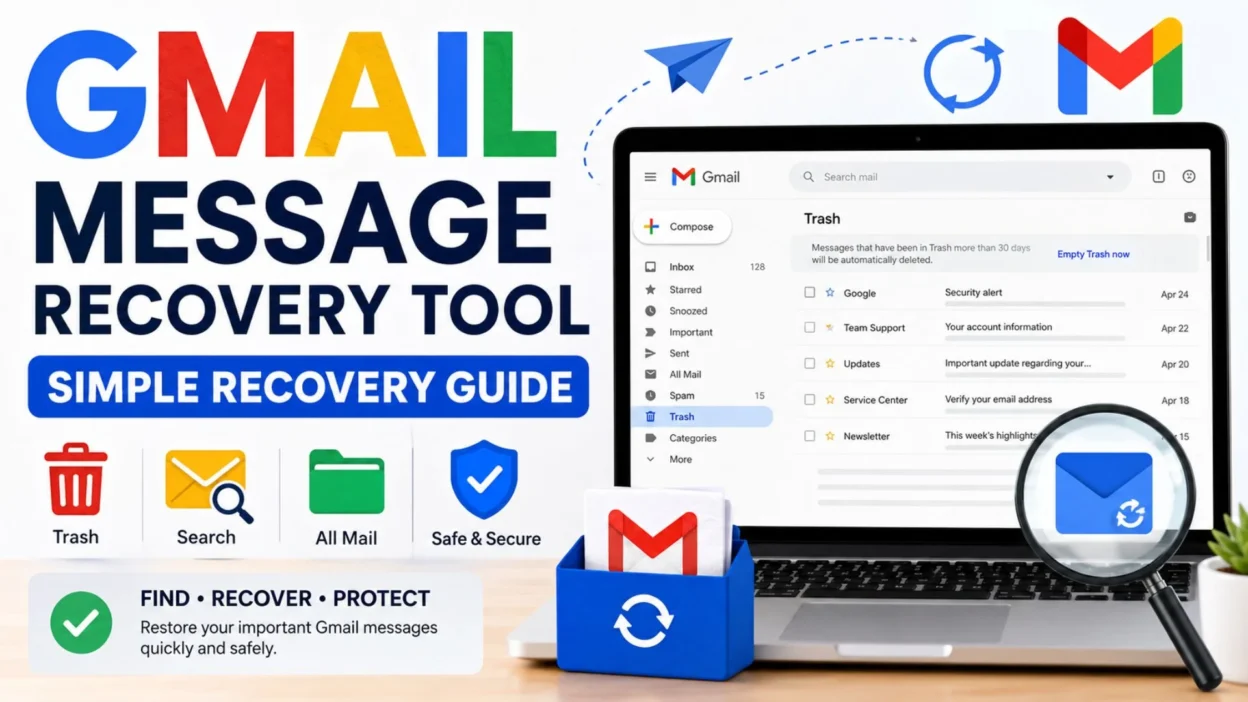
- Gmail Trash: Check the Trash folder first if you recently deleted the message.
- Gmail Search: Search by the sender, subject, or a unique word from the email.
- Spam Folder: Sometimes an important message can be incorrectly identified as spam.
- All Mail: Archived messages may disappear from the Inbox while remaining safely stored in Gmail.
- Filters and Labels: A Gmail filter may have automatically moved the message to another location.
- Google Account Recovery: If you cannot access your account, recovering account access should come before searching for missing emails.
- Gmail Help Resources: Official Gmail guidance can help when normal recovery options do not work.
- Third-Party Recovery Software: Be cautious with external programs because access to your Gmail account or private messages can create security risks.
Check Gmail Trash First
When an email is deleted, the first place to look is the Trash folder. This is one of the simplest recovery steps and does not require installing additional software.
Open Gmail and look for Trash in the left-side menu. If you find the missing message there, open it and use Gmail’s option to move the message back to your Inbox or another folder.
However, deleted messages do not remain in Trash forever. Therefore, checking as soon as possible is important.
Search All Mail
Sometimes an email has not actually been deleted. Instead, it may have been archived or moved away from the Inbox.
That is why Gmail’s All Mail area is useful. Search for the message using a sender’s email address, subject phrase, or memorable keyword.
For example, if you remember that an email contained the word “invoice,” search for that term. Similarly, searching for the sender can narrow the results considerably.
Check Spam Before Using a Recovery Tool
Spam is another place where missing messages can hide. Gmail automatically filters suspicious emails, so an important message may occasionally end up there.
Open the Spam folder and review recent messages. If you find the email you need, use Gmail’s option to report that it is not spam.
Afterward, the message should return to your regular mailbox.
How a Gmail Message Recovery Tool Works
The phrase gmail message recovery tool can describe different things depending on what the user is trying to recover. Some people mean Gmail’s own recovery features, while others are searching for downloadable software or online services.
These options are not the same.
A Gmail recovery feature works within Google’s email system. On the other hand, third-party recovery software may ask for account access, permissions, or other information.
Therefore, you should understand the situation before giving any outside service access to your mailbox.
- Gmail’s built-in options should generally be checked first.
- A missing email may simply be archived rather than deleted.
- Deleted messages may remain in Trash for a limited period.
- Spam should always be checked before assuming an email is gone.
- Search operators can make it easier to locate older messages.
- Third-party recovery services should be researched carefully before use.
- Never share your Gmail password with an unknown recovery website.
- Avoid tools that make unrealistic promises about recovering permanently deleted emails.
Short Gmail Message Recovery Tool Tips
If you need a quick checklist, these simple tips can help you search for a missing Gmail message.
- Check Trash first.
- Search All Mail.
- Review the Spam folder.
- Search using the sender’s email address.
- Search using a unique subject word.
- Check Gmail labels.
- Review your Gmail filters.
- Look for archived messages.
- Confirm that you are using the correct Google account.
- Avoid unknown recovery software.
- Do not share your Gmail password with third-party services.
- Try Gmail’s official recovery and help options before installing anything.
- Act quickly when a message has recently been deleted.
- Check whether another device still displays the missing message.
- Search for related replies or forwarded copies.
Best Gmail Message Recovery Tool Practices
Recovering an email is not only about finding the right button. It is also about protecting your account while you search.
First, use Gmail’s own features whenever possible. They are designed to work with your account and do not require you to hand your password to another company.
Next, think about what happened to the email. If you accidentally deleted it, Trash is the logical starting point. If you simply cannot find it, however, Search, All Mail, Spam, labels, and filters are better places to investigate.
In addition, consider whether the message may have been moved by another action. For example, a filter could automatically apply a label or remove a message from your Inbox.
Most importantly, avoid rushing into third-party recovery tools. A service that asks for complete access to your mailbox deserves careful attention. Read its privacy policy, check who operates it, and understand exactly what permissions it requests.
When You May Not Need a Recovery Tool
Many missing emails do not require specialized recovery software.
For example, an archived message can look deleted because it is no longer visible in the Inbox. Similarly, a filtered message may appear missing even though it is still stored in the account.
Therefore, take a few minutes to search Gmail thoroughly before assuming that the email is permanently lost.
If the message is still available somewhere in your mailbox, Gmail’s normal features are usually the safest and simplest solution.
Gmail Message Recovery Tool for Deleted Emails
Deleted emails are one of the most common reasons people search for a gmail message recovery tool. Before trying another service, check whether the message is still available in Gmail’s Trash folder.
- Open Gmail and find the Trash folder.
- Search through the deleted messages for the email you need.
- Use the sender’s name or email address to narrow your search.
- Check the subject line if you remember it.
- If you find the message, move it back to your Inbox or another suitable folder.
- After recovering it, consider adding a label so it is easier to find later.
- Remember that recently deleted and permanently removed messages can have different recovery possibilities.
Search Gmail More Carefully
Sometimes the problem is not deletion at all. Instead, the email may simply be difficult to locate.
Therefore, Gmail’s search feature can be one of the most useful recovery methods. Try searching with specific information instead of using broad words.
- Search for the sender’s email address.
- Search for a distinctive phrase from the subject.
- Search for a word you remember from the message.
- Search for the name of an attachment.
- Search by approximate date when possible.
- Search for related conversations instead of only one message.
- Check results outside your Inbox.
- Look through archived messages if the email is not appearing in the Inbox.
Gmail Message Recovery Tool for Archived Messages
Archiving is another common reason an email appears to have vanished. When you archive a message, Gmail removes it from the Inbox, but the message can still remain in your account.
This is important because an archived email is not necessarily a deleted email.
- Open Gmail’s All Mail section.
- Search for the sender or subject.
- Look through the search results for the missing conversation.
- Open the conversation when you find it.
- Move it back to the Inbox if you want it to appear there again.
- Add a label if you want easier access in the future.
- Check your archive regularly if you often organize messages this way.
Look at Gmail Filters
Gmail filters can automatically organize incoming messages. However, an old or incorrectly configured filter can sometimes make an important email difficult to find.
For example, a filter may automatically archive a message, apply a label, delete it, or move it away from your usual Inbox view.
- Review your Gmail filter settings.
- Look for filters that mention the sender.
- Check filters connected to specific words or subjects.
- Review actions that automatically archive incoming messages.
- Look for rules that apply labels automatically.
- Remove or adjust a filter if it is causing unexpected behavior.
- Send yourself a test email afterward if you want to confirm the filter works correctly.
Gmail Message Recovery Tool for Missing Messages
A missing email can sometimes result from using the wrong account. This is especially common when someone has several Gmail addresses for work, school, personal use, or other purposes.
Before assuming that the message is gone, confirm that you are viewing the correct account.
- Check the Google account currently signed in.
- Switch between accounts if you use more than one Gmail address.
- Search the other account for the missing message.
- Confirm the sender used the correct email address.
- Ask the sender whether the message was successfully delivered.
- Check whether you received a reply or forwarded copy somewhere else.
- Search other email folders before assuming permanent deletion.
Best Gmail Message Recovery Tool Safety Tips
Recovery should never put your account at greater risk. Consequently, security should be part of the recovery process.
- Avoid websites that promise guaranteed recovery of every deleted Gmail message.
- Never give your Gmail password to an unknown recovery service.
- Be careful with software that requests unnecessary account permissions.
- Check the reputation of a third-party service before using it.
- Read its privacy policy before providing personal information.
- Avoid downloading recovery software from unfamiliar websites.
- Keep your Google account protected with strong security settings.
- Use two-step verification when available for your account.
- Review connected apps and remove access you no longer need.
- Be suspicious of services that demand payment before explaining what they can actually recover.
Why Third-Party Recovery Tools Can Be Risky
A third-party gmail message recovery tool may sound convenient, especially when an important email seems permanently lost. However, convenience should not come at the expense of privacy.
Your Gmail account can contain personal conversations, documents, receipts, account notifications, photos, and sensitive information. Therefore, giving an unknown service access to your mailbox can create unnecessary risks.
Instead, start with Gmail’s own search and recovery options. If those methods do not solve the problem, carefully investigate any external service before deciding whether it is appropriate.
One-Line Gmail Message Recovery Tool Tips
These quick reminders are useful when you need to troubleshoot a missing email without reading a long guide.
- Check Trash before assuming the email is gone.
- Search All Mail for archived messages.
- Review Spam for incorrectly filtered emails.
- Search using the sender’s address.
- Try searching a unique subject phrase.
- Check your Gmail labels.
- Review your filters for unexpected actions.
- Confirm that you are using the right Gmail account.
- Look for forwarded copies of important emails.
- Ask the sender to resend the message when necessary.
- Avoid unknown recovery websites.
- Protect your Google account while troubleshooting.
- Review connected applications before granting new permissions.
- Save important emails before they become difficult to locate.
- Use Gmail’s built-in tools before considering external software.
Best Ways to Prevent Future Email Loss
Recovering a missing message is useful, but preventing the problem is even better. Once you find an important email, take a few simple steps to protect it.
For example, you can apply a useful Gmail label to important conversations. Likewise, you can archive messages instead of deleting them when you simply want to clean up your Inbox.
- Create labels for work, personal, financial, and important messages.
- Archive important emails instead of deleting them unnecessarily.
- Star messages that you may need again soon.
- Keep important attachments stored safely elsewhere when appropriate.
- Review filters occasionally.
- Remove unnecessary filters that no longer serve a purpose.
- Keep your Google account secure.
- Be careful when deleting large groups of messages.
- Double-check selected emails before confirming deletion.
- Keep copies of particularly important documents.
When a Recovery Tool Is Not the Answer
It is tempting to search for specialized software immediately after an important email disappears. However, a recovery program cannot automatically solve every Gmail problem.
If the message was simply archived, a search is enough. Similarly, if a filter moved it to another folder, changing the filter may solve the issue.
Therefore, identify the cause before choosing a solution. This approach is usually faster, safer, and easier than installing several different recovery programs.
What to Do If the Email Still Cannot Be Found
If you have checked Trash, Spam, All Mail, labels, filters, and other accounts but still cannot find the message, do not keep guessing.
First, confirm the email details with the sender. Ask when it was sent, which address received it, and what the subject line was.
Next, check whether another copy exists in a reply, forwarded message, attachment, or related conversation. In some situations, the easiest solution is simply to ask the sender to send the email again.
Finally, use official Google account and Gmail support resources when the problem involves account access or unusual account activity.
Best Gmail Message Recovery Tool for Captions
If you are creating a quick social post about recovering an important email, these short lines can work as captions. They are simple, relatable, and easy to share.
- Lost an important email? Start with Gmail’s built-in recovery options before trying outside tools.
- Sometimes the email is not gone; it is simply hiding in the wrong folder.
- Before panicking about a deleted Gmail message, check Trash, Spam, and All Mail.
- A careful Gmail search can sometimes save you from using a third-party recovery tool.
- Missing email? Search smart, check every folder, and protect your account.
- Not every lost email needs recovery software. Sometimes, Gmail already has the answer.
- Before trusting an unknown recovery service, explore Gmail’s own recovery options.
- A missing message can be frustrating, but a few simple checks may bring it back.
- Search first, recover carefully, and never give your Gmail password to strangers.
- Important email missing? Check Gmail thoroughly before assuming it is permanently gone.
Copy-Paste Ready Gmail Message Recovery Tool Tips
These ready-to-use tips are useful when you need a simple checklist for yourself or someone else.
- Check Trash: Look for recently deleted messages before trying another recovery method.
- Check Spam: An important message may have been incorrectly filtered.
- Search All Mail: Archived messages can remain available even when they are no longer visible in the Inbox.
- Use Gmail Search: Search by sender, subject, keyword, or other details you remember.
- Review Labels: The message may have been organized under a label instead of remaining in the Inbox.
- Check Filters: An automatic Gmail rule may have moved or organized the message.
- Confirm Your Account: Make sure you are searching the correct Gmail address.
- Contact the Sender: If the message cannot be located, asking for another copy may be the quickest solution.
- Protect Your Account: Avoid giving your Gmail password or unnecessary permissions to unknown services.
- Try Official Help: When normal options do not work, use Google’s official account and Gmail support resources.
Gmail Message Recovery Tool FAQs
Can I recover a deleted Gmail message?
You may be able to recover a recently deleted message if it is still available in Gmail’s Trash. Therefore, check Trash as soon as possible instead of assuming the email is permanently gone.
Is there an official Gmail message recovery tool?
Gmail provides built-in features and account recovery options that can help with different email problems. However, the best method depends on whether the message was deleted, archived, filtered, marked as spam, or affected by an account-access issue.
Can a third-party Gmail message recovery tool recover every email?
No tool should be treated as a guaranteed solution for every missing Gmail message. In addition, services promising unlimited recovery deserve caution, particularly if they request sensitive account information or unnecessary permissions.
What should I check if my Gmail message disappeared?
Start with Trash and Spam. Then search All Mail, review labels and filters, and confirm that you are using the correct Google account. If necessary, ask the sender to resend the message.
Is it safe to give a recovery tool access to Gmail?
You should be very careful. Gmail can contain private conversations, documents, receipts, and other sensitive information. Therefore, research any third-party service carefully and avoid sharing your password with unknown websites or software.
How to Choose a Safe Gmail Message Recovery Tool
If you decide to investigate an external gmail message recovery tool, take your time before granting access.
A trustworthy-looking website is not automatically safe. Instead, examine what the service does, what information it requests, and who operates it.
- Look for clear information about the company or developer.
- Read the privacy policy before providing account information.
- Check what permissions the service requests.
- Avoid services that demand your Gmail password directly.
- Be cautious of unrealistic promises about permanent email recovery.
- Research independent reviews before installing software.
- Download applications only from reputable sources.
- Remove account permissions that you no longer need.
- Stop using a service if it behaves suspiciously or requests unnecessary information.
Gmail Recovery Is Often Simpler Than It Looks
The phrase gmail message recovery tool can make email recovery sound complicated. However, many missing messages can be found without installing anything.
For example, an archived email may still be sitting safely in your account. Likewise, a message placed in Spam can often be restored. Even a message that seems lost may appear when you use the right search terms.
Therefore, patience is important. Start with Gmail’s built-in features, identify what happened to the message, and only then consider whether another solution is necessary.
Final Thoughts on Gmail Message Recovery Tool
Losing an important email can be frustrating, but you do not always need complicated software to find it. In many situations, Gmail’s own search, Trash, Spam, All Mail, labels, and filters provide useful places to look.
The best approach is to stay calm and work through the possibilities one at a time. First, check where deleted or filtered messages may have gone. Next, confirm that you are using the correct account. Then, search carefully using the sender, subject, or keywords you remember.
If you are considering a gmail message recovery tool, remember that privacy matters just as much as recovery. Avoid unknown services that request your password or make unrealistic promises. Instead, use Gmail’s built-in options first and investigate external tools carefully.
Finally, protect important emails in the future by using labels, archiving instead of unnecessary deletion, and keeping important information stored safely when appropriate.
The safest recovery often starts with a simple search, not a complicated tool.

Ryan Mitchell is a professional content writer who specializes in creating heartfelt messages, wishes, greetings, and inspirational quotes for every occasion. He is passionate about helping readers express their thoughts and emotions through meaningful, engaging, and easy-to-share content.