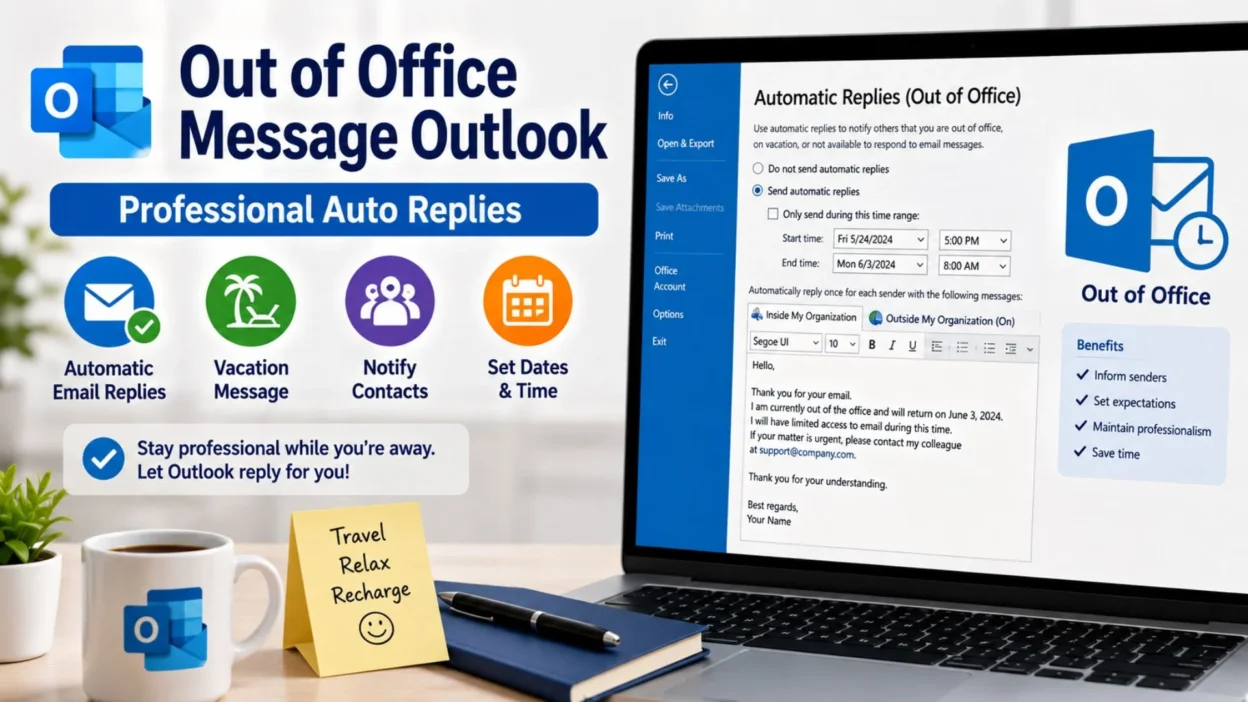
There are times when stepping away from work is necessary, whether you’re enjoying a vacation, attending a conference, taking personal leave, or simply disconnecting for a well-deserved break. However, staying professional while you’re away is just as important as responding promptly when you’re in the office. That’s why setting up an out of office message Outlook auto reply is one of the easiest ways to keep colleagues, clients, and business partners informed.
A thoughtful automatic reply lets people know you received their email, explains when you’ll return, and, if necessary, directs them to someone who can help in the meantime. Moreover, a well-written message builds trust and sets clear expectations. Instead of leaving senders wondering why they haven’t heard back, you can communicate professionally even while you’re away. Therefore, we’ve gathered the best out of office message Outlook examples that are simple, polished, and ready to copy for nearly every situation.
Top Out of Office Message Outlook Messages
Whether you’re away for a few hours or several days, these professional auto replies work well in most situations.
- Thank you for your email. I am currently out of the office and will respond as soon as possible upon my return.
- I appreciate your message. I’m away from work today and will reply when I return.
- Thank you for reaching out. I am currently out of the office with limited access to email.
- I’m away from my desk and will respond to your email after I return.
- Thank you for your patience while I’m out of the office.
- I am currently unavailable and will get back to you at my earliest opportunity.
- Your email has been received, and I’ll respond as soon as I’m back.
- I’m currently on leave and unable to respond immediately.
- Thank you for your understanding while I’m away.
- I appreciate your email and will reply promptly upon my return.
- I’m taking a short break from work and will respond as soon as possible.
- Thank you for contacting me. I’ll reply after returning to the office.
- I am away on business travel and may have limited access to email.
- Your message is important to me, and I’ll respond as soon as I’m available.
- I’m currently out of the office and appreciate your patience.
- Thank you for your email. I’ll be back soon and will reply then.
- I’m unavailable today but will respond after returning.
- Thank you for your understanding during my absence.
- I appreciate your message and look forward to assisting you soon.
- Have a wonderful day, and thank you for your patience.
Short Out of Office Message Outlook Messages
Sometimes a brief automatic reply is all you need. Therefore, these short out of office message Outlook examples are perfect for quick and professional responses.
- I’m currently out of the office.
- Thank you for your email.
- I’ll reply when I return.
- Away with limited email access.
- I’ll respond as soon as possible.
- Thanks for your patience.
- I’m currently unavailable.
- Back soon.
- I’ll get back to you shortly.
- Away from my desk today.
- Thank you for reaching out.
- Your email has been received.
- I appreciate your message.
- Currently on leave.
- Limited email access today.
- Thank you for understanding.
- I’ll respond upon my return.
- Out of office today.
- Looking forward to assisting you soon.
- Have a great day!
Best Out of Office Message Outlook Messages for Sharing
If you want your automatic reply to sound warm, professional, and helpful, these examples are excellent choices. Additionally, you can personalize them with your return date or alternate contact information.
- Thank you for your email. I’m currently out of the office and will respond as soon as possible after I return.
- I appreciate your message. During my absence, responses may take a little longer than usual.
- Thank you for your patience while I’m away from work.
- I’m currently on leave and have limited access to email.
- Your message is important, and I’ll respond as soon as I’m back.
- Thank you for contacting me. I’ll review your email upon my return.
- I appreciate your understanding during my time away.
- If your matter is urgent, please contact a member of our team.
- Thank you for your patience and continued support.
- I’ll respond to your email as quickly as possible after returning.
- I appreciate your understanding and look forward to connecting soon.
- Thank you for your email and your patience.
- I’m away today but will assist you as soon as I’m available.
- Thanks for reaching out. I’ll reply after returning to the office.
- Your email has been safely received.
- Thank you for allowing me time to respond.
- I appreciate your continued patience.
- I’ll be happy to assist you once I’m back.
- Thank you again for your understanding.
- Wishing you a wonderful day.
One-Line Out of Office Message Outlook Messages
Sometimes a simple sentence is all you need. Whether you’re away for a meeting, vacation, or personal leave, these one-line out of office message Outlook examples keep your automatic reply professional.
- Thank you for your email. I’m currently out of the office.
- I’ll respond as soon as I return.
- I appreciate your message and your patience.
- I’m away today with limited email access.
- Your email has been received successfully.
- I’ll reply as soon as I’m available.
- Thank you for understanding.
- I’m currently on leave.
- I’ll be back soon.
- Thanks for reaching out.
- I appreciate your email.
- I’ll respond at my earliest opportunity.
- I’m unavailable at the moment.
- Thank you for your patience while I’m away.
- Looking forward to assisting you soon.
- Your message is important to me.
- I’ll review your email upon my return.
- Wishing you a wonderful day.
- Thanks again for your understanding.
- Have a great day!
Best Out of Office Message Outlook Messages for Sharing
These professional replies work well for clients, coworkers, vendors, and business contacts. Moreover, they create a positive impression while keeping expectations clear.
- Thank you for your email. I’m currently out of the office and will reply as soon as possible after I return.
- I appreciate your message and your patience during my absence.
- Thank you for reaching out. Responses may be delayed while I’m away.
- I’m currently on vacation with limited access to email.
- Thank you for your understanding while I’m out of the office.
- If your request is urgent, please contact my colleague for immediate assistance.
- Your email has been received and will be reviewed upon my return.
- Thank you for allowing extra time for my response.
- I appreciate your patience and look forward to helping you soon.
- I’m currently attending business meetings and may respond later than usual.
- Thank you for your continued support.
- I’ll reply as quickly as possible after returning.
- I appreciate your understanding during this time.
- Your message is important and will receive my attention soon.
- Thank you for contacting me today.
- I’ll respond as soon as I’m back in the office.
- Thank you for your professionalism and patience.
- I look forward to reconnecting after my return.
- Thanks again for your email.
- Have a wonderful day.
Out of Office Message Outlook for Vacation
Vacation auto replies should be warm, friendly, and professional. Therefore, these examples let others know you’re away while reassuring them you’ll respond later.
- Thank you for your email. I’m currently on vacation and will reply after I return.
- I’m away enjoying some personal time and have limited access to email.
- Thank you for your patience while I’m out on vacation.
- I’ll review your message as soon as I’m back.
- I’m currently away from work and unable to respond immediately.
- Thank you for understanding during my vacation.
- I’ll return to the office soon and respond promptly.
- I appreciate your email and look forward to assisting you after my return.
- If your matter is urgent, please contact my team.
- Thanks for reaching out. I’ll respond after my vacation ends.
- I’m taking a short break and will reply when I return.
- Thank you for your understanding and patience.
- Your email is important and will be reviewed soon.
- I appreciate your support while I’m away.
- I’ll be back shortly and ready to help.
- Thank you for your continued patience.
- Wishing you a wonderful week.
- I’ll reconnect with you soon.
- Thanks again for your message.
- Have a fantastic day!
Out of Office Message Outlook for Business Travel
Business trips often limit email availability. However, these replies let people know you’ll respond as soon as possible.
- Thank you for your email. I’m currently traveling for business and have limited access to email.
- I’ll respond as soon as my schedule allows.
- Thank you for your patience during my business trip.
- I’m attending meetings and may experience delays in responding.
- I appreciate your understanding while I’m traveling.
- Your message has been received successfully.
- I’ll review your email after my meetings.
- Thanks for reaching out today.
- I’ll respond as quickly as possible.
- Thank you for your continued patience.
- If your request is urgent, please contact my office.
- I’m currently working remotely while traveling.
- I appreciate your email and will reply soon.
- Thank you for understanding my delayed response.
- Your message is important to me.
- I’ll get back to you after my travel schedule allows.
- Thank you for your support.
- Looking forward to connecting soon.
- I’ll respond upon my return.
- Have a productive day!
Copy-Paste Ready Out of Office Message Outlook Messages
Need a professional auto reply immediately? Fortunately, these templates are ready to copy into Microsoft Outlook.
- Thank you for your email. I’m currently out of the office and will respond as soon as possible after I return.
- I appreciate your message. During my absence, responses may take longer than usual.
- Thank you for reaching out. I’m currently away with limited access to email.
- If your request is urgent, please contact another member of our team for immediate assistance.
- Your email has been received successfully and will be reviewed upon my return.
- Thank you for your patience and understanding.
- I’ll respond as quickly as possible after returning to the office.
- I appreciate your continued support and look forward to connecting soon.
- Thank you for allowing additional time for my response.
- I’ll be happy to assist you once I’m available again.
- I appreciate your professionalism and understanding.
- Thank you for contacting me today.
- I’ll review your email carefully after returning.
- Your patience is sincerely appreciated.
- Thank you for your cooperation.
- I look forward to speaking with you soon.
- Your email is important and will receive my attention.
- Thank you once again for reaching out.
- I appreciate your understanding during my absence.
- Have a wonderful day.
Best Out of Office Message Outlook Messages for Captions
If you’re sharing a work update or announcing your time away on social media or a professional platform, these short captions work well. Additionally, they sound friendly without losing professionalism.
- Taking a short break and will be back soon. ✈️
- Away today, but I’ll reply as soon as I return.
- Out of the office, yet looking forward to reconnecting.
- Time to recharge before the next big project.
- Thanks for your patience while I’m away.
- Stepping away today, returning refreshed.
- Every break creates room for better ideas.
- See you soon with renewed energy.
- Out of office, but grateful for your understanding.
- Away for now, back before you know it.
- Rest today, respond tomorrow.
- Professional today, refreshed tomorrow.
- Thank you for your patience and support.
- A short pause leads to better productivity.
- Looking forward to connecting again soon.
- Recharging so I can serve you better.
- Away from my inbox, not from my commitment.
- Back soon and ready to help.
- Thank you for understanding.
- See you again very soon.
More Copy-Paste Ready Out of Office Message Outlook Messages
Need another professional template? Furthermore, these messages are easy to customize with your return date or an alternate contact.
- Thank you for your email. I’m currently out of the office and will respond as soon as possible after I return.
- I appreciate your message. My replies may be delayed while I’m away.
- Thank you for reaching out. I’ll review your email upon my return.
- I’m currently away from work with limited access to email.
- If your request is urgent, please contact a member of my team for immediate assistance.
- Thank you for your understanding and continued patience.
- Your email has been received and will not be overlooked.
- I’ll respond as quickly as possible once I’m back.
- Thank you for allowing extra time for my reply.
- I appreciate your patience during my absence.
- I’ll be happy to assist you after returning to the office.
- Thank you for contacting me today.
- I value your email and will respond promptly upon my return.
- Thank you for your cooperation and understanding.
- I appreciate your support and patience.
- Your message is important and will receive my attention soon.
- Thank you for your professionalism.
- I look forward to reconnecting with you shortly.
- Thank you once again for reaching out.
- Have a wonderful day.
Tips for Writing an Effective Out of Office Message Outlook
A professional automatic reply does more than confirm you’re away. Instead, it reassures the sender that their message has been received and sets clear expectations. Likewise, a few simple practices can make your reply more helpful.
- Keep your message short and professional.
- Thank the sender for their email.
- Mention that you’re currently out of the office.
- Include your expected return date when appropriate.
- Explain that responses may be delayed.
- Provide an alternate contact for urgent requests.
- Use a polite and friendly tone.
- Avoid sharing unnecessary personal details.
- Review your message before activating it.
- Update or disable the auto reply when you return.
Frequently Asked Questions
What is an out of office message in Outlook?
An out of office message Outlook is an automatic email reply that informs senders you’re unavailable and lets them know when they can expect a response.
How do I set up an out of office message in Outlook?
In Outlook, open Automatic Replies (Out of Office), enable the feature, write your message, choose your dates if needed, and save your settings.
What should I include in an out of office message Outlook?
A good message should thank the sender, explain that you’re away, mention when you’ll return or when you’ll respond, and provide an alternate contact if the matter is urgent.
Should I include my vacation details?
No. Generally, it’s best to keep your message professional and avoid sharing detailed personal information. Simply state that you’re out of the office and unavailable.
Can I use different messages for internal and external contacts?
Yes. Outlook allows you to create separate automatic replies for coworkers inside your organization and people outside your organization.
Conclusion
A well-written out of office message Outlook helps you stay professional even when you’re away from your desk. Whether you’re taking a vacation, traveling for business, attending training, or enjoying personal leave, an automatic reply lets people know their email has been received while setting realistic expectations. Moreover, clear communication reduces confusion and ensures important contacts know what to expect.
The examples in this guide provide ready-to-use templates for every situation, including vacations, business trips, short absences, and everyday office communication. In addition, they’re easy to customize with your return date, alternate contact, or company information. By saving a few of your favorite templates, you’ll always have a polished response ready whenever you’re away. Finally, a thoughtful out of office message Outlook reflects professionalism, respect, and reliability, helping you maintain strong communication even when you’re offline.

Ryan Mitchell is a professional content writer who specializes in creating heartfelt messages, wishes, greetings, and inspirational quotes for every occasion. He is passionate about helping readers express their thoughts and emotions through meaningful, engaging, and easy-to-share content.